
Allsorter helps Organization Administrators and Organization Managers monitor account usage by providing access to the current credit balance and sending an automated notification when the available credits are running low.
This allows your organization to review its usage before the next billing or renewal date and purchase additional credits when required.
Automated Low-Credit Email Notification
How Are Credits Used
Credits are used when CVs or resumes are uploaded into Allsorter and when other features that consume credits within the platform are used by you or your team. Allsorter Customer Success will inform you if turning on a new feature will consume additional credits on a one-off or recurring basis.
If the same CV is uploaded more than once, each upload uses credits again. This means repeated uploads of the same document will reduce your available balance faster. Similarly, using "reparse as docx" consumes an additional credit for the same CV. Credits are not consumed on export, so you can export the same CV as pdf or docx any number of times.
View Your Remaining Credits
Organization Administrators and Managers can check the organization’s current credit balance at any time.
To view this information:
- Log in to Allsorter.
- Select the Account button.
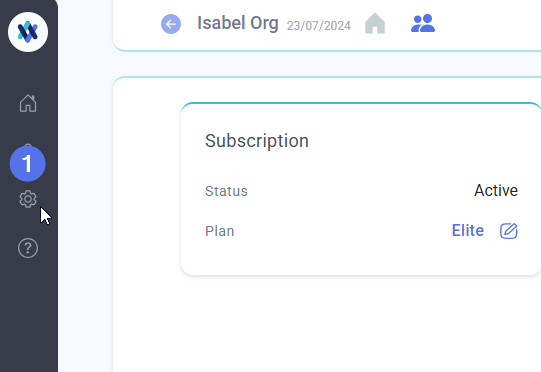
- Locate the Credits section.
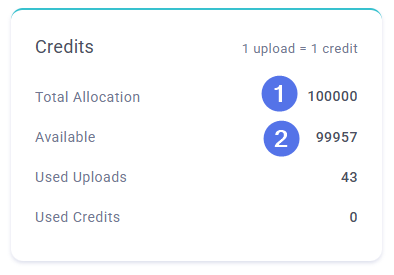
The Credits section displays:
- Total allocation: The total number of credits allocated to the organization for the current billing cycle.
- Available allocation: The number of credits that remain available.
- Used uploads: The number of CVs or resumes uploaded during the current billing cycle.
- Used credits: The number of credits used across Allsorter features other than through uploading CVs or resumes.
Note: Only users with Organization Administrator or Manager permissions can access the full organization details and usage information.
Automated Low-Credit Email Notification
The system automatically sends an email notification to the Organization Administrator when the remaining credit balance is 15% or less of the organization’s total allocation.
The notification is a reminder to:
- Review the remaining credit balance.
- Check when the current billing cycle or subscription period ends.
- Determine whether the remaining credits will be sufficient.
- Purchase additional credits before the balance is fully used.
The email is sent to the Organization Administrator associated with the account. Organizations should ensure that their administrator details are kept up to date so the notification is received by the correct person.
When do my credits refresh?
The Credits section shows your organisation’s total allocation for the current billing cycle. Your credits refresh when your next billing cycle or subscription period begins.
If you are not sure when your billing cycle renews, check your subscription details or invoice, or ask the Allsorter support chatbot.
If your team is likely to run out of credits before then, see Purchase Additional Credits below.
Purchase Additional Credits
If your team requires additional credits, the Organization Administrator should fill out the support form to request additional credits.
Additional credits may be purchased as:
- A one-time top-up for the current billing cycle, which expire at the end of the cycle.
- A recurring allocation if your organization regularly requires a higher credit allowance on an ongoing basis.
After the purchase is confirmed, an invoice will be issued and will be payable immediately. Once payment has been processed, the additional credits will be added to the organization’s account by the Customer Success team.
Purchasing additional credits before the current balance is fully used can help prevent an interruption to your team’s workflow when the credits run out.
Common Questions
Do credits get used on upload or export?
One credit is used when a CV/resume is uploaded into Allsorter. If you are seeing credits reduce faster than expected, check whether the same CV has been uploaded multiple times or whether your team is using other credit-consuming features. Exporting CVs does not consume credits.
Who receives the low-credit notification?
The automated email is sent to the Organization Administrator associated with the account.
When is the notification sent?
The notification is sent when the remaining credit balance reaches 15% or less of the organization’s total allocation.
Can I check the credit balance before receiving the email?
Yes. Organization Administrators and Managers can check the balance at any time by going to Account > Organization Details > Credits.
Can additional uploads be added before the current balance runs out?
Yes. Additional credits can be purchased at any time. It is recommended that the Organization Administrator or Manager fills out the support form before the available balance is fully used.
What should I do if the balance shown appears incorrect?
Fill out the support form, providing the organization name and details of the erroneous balance displayed in the Credits section.