
Allsorter is designed to provide fast, accurate resume extraction for the vast majority of resume formats. If you come across complicated PDFs and resumes with atypical experience layouts and want to improve Allsorter's data extraction, our Reparse as DOCX and Deep Extract features will handle them with ease.
Handling Complicated PDFs: Reparse as DOCX
Handling Complicated PDFs: Reparse as DOCX
Allsorter handles PDFs seamlessly, but if you come across a resume with any of these elements:
- graphic-filled content,
- encrypted PDF,
- unusual formatting,
- excessive embedded elements,
- scanned pages, or
- images instead of text,
there is a simple solution: the Reparse as a DOCX feature.
You may see this error message in the "Original Resume" tab of the Allsorter edit screen: Original text not found for this CV
This walkthrough provides a step-by-step explanation of the Reparse as DOCX feature. It outlines when this option should be used and shows how it can enhance data extraction from such PDFs.
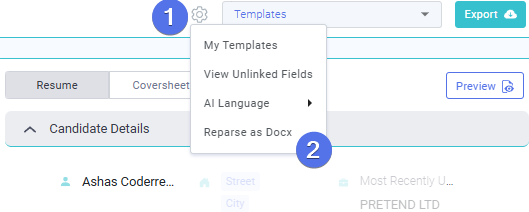
- Click on the engine cog (settings) symbol located next to the template dropdown at the top of the screen.
- From the dropdown menu, choose the Reparse as DOCX option.
-
Wait for Processing: Allow Allsorter to reprocess it into a DOCX format and accurately extract the data.
-
The system will automatically take you to the main dashboard. The file will appear as a recently uploaded document.
-
Click View to open it. Now, the left panel will be fully populated with the Extraction Analysis, giving you a complete breakdown of the resume content.
- You are now ready to edit!
Deep Extract Experiences
Allsorter is designed to provide fast, accurate resume extraction for the vast majority of CV formats. However, in some cases—particularly for clients working in niche verticals such as academia, research, or project-based industries like architecture or construction—CVs may follow highly customized or atypical layouts. In these scenarios, the initial standard experience extraction may not fully capture all relevant data points.
To address this, Allsorter includes an advanced experience data extraction feature known as Deep Extract.
Watch this guide to understand how to use the Deep Extract feature to improve extraction and accuracy, where needed.
A step-by-step guide to run a deep extraction for experience entries:
- Upload the Resume
Allsorter will run a fast initial extraction automatically.
-
Need More Detail?
If experience data appears incomplete or complex, click on the Deep Extract button in the Experience section's heading for a more advanced analysis. -
Allow Extra Time
Deep Extract takes a bit longer but delivers significantly improved results for complex or non-standard CVs. -
Refine, if Needed
Use Retry AI to re-run Deep Extract if the output is still not accurate. This option appears after the first Deep Extract run and replaces the original button.
Note: Deep Extract is specifically designed to improve results on resumes that deviate from standard formatting and layout in their experience sections. While it may take more time to complete, the resulting extraction is more comprehensive and accurate.